Brandi Kitchens
Building a Retrieval-Augmented Generation (RAG) System with Python
A practical engineering walkthrough
Artificial intelligence systems are impressive at generating text. Unfortunately, they are also impressive at confidently inventing information.
If you’ve ever asked an LLM a question about a document it has never seen, you may have experienced this phenomenon firsthand. The model will produce an answer that sounds correct, but may have no grounding in reality.
This is where Retrieval-Augmented Generation (RAG) becomes essential.
A RAG system combines information retrieval with language generation, allowing a model to answer questions based on actual documents rather than relying solely on what it learned during training.
In this article I’ll walk through how I built a document-aware AI system using Python that allows users to upload files and ask questions about them. The system retrieves relevant context and feeds it to a language model to produce grounded responses.
Along the way we’ll cover the architecture, implementation decisions, and some honest observations about where RAG works extremely well—and where it still struggles.
What Problem Does RAG Solve?
Large language models such as GPT-4, Claude, and others are trained on massive datasets, but they have limitations:
- They cannot access private data
- Their knowledge freezes at training time
- They can hallucinate answers
RAG solves this by inserting a retrieval step before generation.
Instead of asking the model:
“What does this document say about X?”
we ask the system to:
- Search relevant documents
- Retrieve the most relevant text
- Provide that context to the model
- Generate a grounded answer
This significantly reduces hallucination and allows LLMs to work with internal or proprietary data.
RAG is now widely used for:
- enterprise knowledge assistants
- legal document search
- research assistants
- support documentation bots
- internal company copilots
High-Level Architecture
A typical RAG system contains several components:
User Question
      │
      ▼
Embedding Model
      │
      ▼
Vector Database (semantic search)
      │
      ▼
Retrieve Relevant Chunks
      │
      ▼
Prompt + Context
      │
      ▼
Language Model
      │
      ▼
Answer
The key idea is semantic retrieval. Instead of keyword matching, we compare vector embeddings representing the meaning of text.
Technology Stack
For this project I used a modern Python AI stack:
| Component | Tool |
|---|---|
| Language | Python |
| Framework | LangChain |
| Vector Store | ChromaDB |
| LLM API | OpenAI |
| Document Parsing | PyPDF / text loaders |
| Backend API | FastAPI |
This stack allows rapid experimentation while remaining production-ready.
Step 1 — Document Ingestion
The first step is allowing the system to ingest documents.
Documents must be:
- Loaded
- Split into manageable chunks
- Converted to embeddings
Chunking is necessary because LLMs have context limits. Feeding entire documents is rarely practical.
Example chunking pipeline:
from langchain.text_splitter import RecursiveCharacterTextSplitter

splitter = RecursiveCharacterTextSplitter(
    chunk_size=500,
    chunk_overlap=50
)

chunks = splitter.split_documents(docs)
Chunk sizes between 300–800 tokens typically perform well.
Step 2 — Embedding the Text
Next we convert each chunk into a vector embedding.
Embeddings represent semantic meaning numerically.
from langchain.embeddings.openai import OpenAIEmbeddings

embedding_model = OpenAIEmbeddings()
Each text chunk becomes a vector in high-dimensional space.
Similar ideas appear near each other in this space.
Step 3 — Store in a Vector Database
We store embeddings in a vector database such as:
- ChromaDB
- Pinecone
- Weaviate
- FAISS
For this project I used ChromaDB, which is lightweight and easy to run locally.
from langchain.vectorstores import Chroma

vectorstore = Chroma.from_documents(
    chunks,
    embedding_model
)
Now the system can perform semantic search.
Step 4 — Retrieval
When a user asks a question:
- The question is embedded
- The vector database finds similar chunks
- Relevant context is returned
Example retrieval:
retriever = vectorstore.as_retriever(
    search_kwargs={"k": 4}
)

docs = retriever.get_relevant_documents(question)
The k parameter determines how many chunks are retrieved.
Too small → missing context Too large → noise in the prompt
In practice 3–6 chunks tends to work well.
Step 5 — Augmented Generation
The retrieved context is inserted into the prompt.
Example prompt structure:
Use the following context to answer the question.

Context:
{retrieved_documents}

Question:
{user_question}
Then we send the prompt to the language model.
from langchain.chains import RetrievalQA

qa_chain = RetrievalQA.from_chain_type(
    llm=llm,
    retriever=retriever
)

answer = qa_chain.run(question)
Now the model answers using real document context.
What Worked Well
From building this system, a few things stood out.
RAG dramatically improves reliability
Grounding answers in retrieved text significantly reduces hallucination.
This is especially valuable for business documents, research, or knowledge bases.
Vector search is surprisingly powerful
Semantic search works far better than traditional keyword search.
A query like:
“How does the system handle authentication?”
can retrieve text mentioning login tokens, user verification, or session management.
Where RAG Still Struggles
Despite the excitement around RAG systems, they are not perfect.
Chunking strategy matters
Poor chunking can break context.
If a paragraph is split across chunks, the model may miss critical information.
Retrieval noise
Vector databases sometimes retrieve text that is similar but not actually relevant.
This can confuse the language model.
Prompt design matters
Prompt engineering still plays a role in ensuring the model stays grounded in the retrieved data.
Lessons from Building This System
A few practical lessons emerged during development.
1. Retrieval quality matters more than model size
A smaller model with strong retrieval often beats a large model with weak retrieval.
2. Observability is essential
Debugging RAG requires visibility into:
- retrieved chunks
- embedding similarity
- prompt construction
3. Evaluation is often overlooked
Production RAG systems need evaluation pipelines to measure answer quality.
Why RAG Is Becoming a Core AI Architecture
RAG systems have become one of the most widely adopted AI architectures because they solve a fundamental limitation of language models: lack of access to external knowledge.
By combining retrieval with generation, RAG allows LLMs to operate as knowledge assistants rather than guessing machines.
Many enterprise AI products today rely on RAG architectures.
Final Thoughts
Building a RAG system is one of the best ways to understand how modern AI applications work in practice.
It combines several disciplines:
- natural language processing
- machine learning embeddings
- information retrieval
- API engineering
And perhaps most importantly, it forces engineers to confront the reality that AI systems are not magic—they are systems engineering problems.
Sometimes elegant. Sometimes messy. Occasionally stubborn.
But when the retrieval works and the model answers with precise, grounded knowledge, the result feels remarkably close to a true AI assistant.
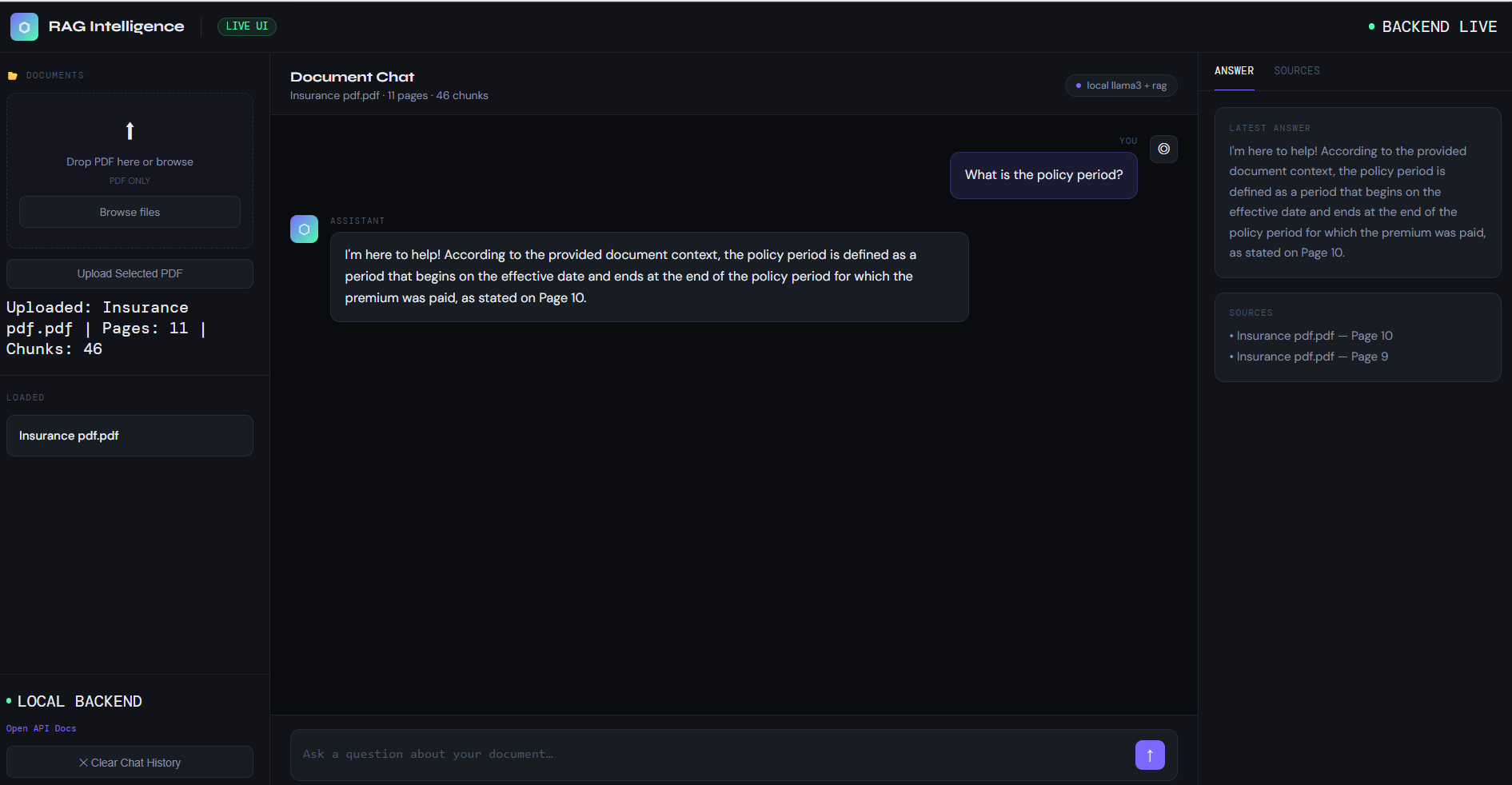
RAG System Interface
Below is the working dashboard of the RAG system.
References
Lewis et al., Retrieval-Augmented Generation for Knowledge-Intensive NLP Tasks (2020) https://arxiv.org/abs/2005.11401
LangChain Documentation https://docs.langchain.com
Chroma Vector Database https://docs.trychroma.com
OpenAI Embeddings Guide https://platform.openai.com/docs/guides/embeddings